- 인터넷은 우리에게 자유를 주었습니다. 저희는 자유를 얻기 위해 지식을 통합하고 체계화하고 공유합니다. 랜선 위 정글에서 살아남기 위해 저희는 시키는 일만 하는 꿀벌 대신 고객을 위해 창조하고 혁신하는 게릴라가 되겠습니다.
- 024042463
- 01032667931
- [email protected]


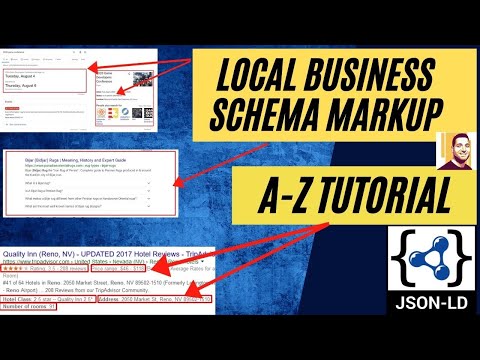
지역 비즈니스를 위한 스키마 작성 방법 A-Z 튜토리얼(How to Write Schema For Local Business A-Z Tutorial | Advanced Local SEO Part 2 | Brock Misner)
최종정리
이 동영상에 알려주는 노하우를 이해하기 위해 2021-07-24 기준 3일 이상의 시간이 들었습니다.
동영상에 알려주는 개념(노하우)는 정말 대단합니다. 그러나 코딩이 필요없는 빠른 적용은 Schema & Structured Data for WP & AMP 플러그인을 이용하세요.
지역업체는 물론 리뷰 스키마까지 깔금하게 설정됩니다. (hasMap schema에 구글지도 cid를 넣어주는 수동이므로 잊지 않고 추가해주시면 됩니다. )
이 동영상에 설명하는 것중 ‘topicalrelevance.com 을 이용하여 Frequency와 Relevance를 증대시키는 schema 추가하기’는 Custom schema 로 올려주세요. ( about과 mentions은 구조회된 데이터 분석도구중 WebPage에서 확인할 수 있습니다.)
| 목차 |
| – Schema & Structured Data for WP & AMP 플러그인을 이용하여 LocalBusiness schema 기본 만들기 — 구글지도를 스키마에 추가하기 ( How to Markup Your Google Map with Schema ) : hasMap schema에 구글지도 cid를 넣어주세요. ( hasMap A Schema.org Property 는 Thing > Place > LocalBusiness 중 하나 A Schema.org Type에서만 설치할 수 있습니다. Website A Schema.org Type 는 사용할 수 없습니다. ) — addressLocality – topicalrelevance.com 을 이용하여 Frequency와 Relevance를 증대시키는 schema 추가하기 : topicalrelevance.com 를 실행하면 “@type”:”WebPage” Schema.org Type 이 생성되는데 “headline”:”REPLACE WITH HEADLINE”, “url”:”REPLACE WITH URL” 부분만 맞게 변경한후, copy하여 Schema & Structured Data for WP & AMP 플러그인의 Custom schema 로 올려주세요. – Schema & Structured Data for WP & AMP 플러그인을 이용하여 Webpage type 스키마를 만들고 저자가 동영상에 소개한 property중 name,keyword, image 만 을 적용하세요. – 동영상의 저작가 소개하는 Website Type(@Website Type) 의 publisher, award, about, hasPart 속성은 적용하지 말아주세요. Website Type 을 적용하면 구조화된 데이터 테스팅 도구 에서 에러가 나옵니다.( WebPage type과 Website Type 은 별개의 스키마 타입입니다.) — 주석 : 동영상에서 소개한 코드에는 있는데, 자막에서는 특별하게 소개하는 것같지 않아 여기서 짤게 주석을 달았습니다. hasPart는 CreativeWorkproperty(thrtjd)으로 해당 웹페이지는 중요한 페이지로 about(소개), 예약(reservation), 연락처(contact form) 페이지로 구성(hasPart)되어 있는 그 페이지는 이런 것들이 있다고 설명하는 것입니다.( WebSite hasPart WebPage(반대는 isPartOf 입니다. WebPage isPartOf WebSite)– 그리고 시간이 되시면 지식패널(지식 그래프)을 적용하세요.동영상 저자의 schema 원본은 https://docs.google.com/document/d/1BxL6RFb1E1mkHYYL-t5E_-tOWv-HFiFKNCnq-dTVEiU/edit 에 있습니다. – 검증 : 리치검색결과 테스트( https://search.google.com/test/rich-results ) 로 해주세요. |
아래 동영상의 제작자인 Brock Misner 는 지금까지 내가 알고 있는 Local EO중 최고입니다.
2021-06-29 기준 아래의 동영상을 16시간째 연구하고 있습니다. 너무나 좋은 내용이 많지만 모두를 적용하고자 한다면 너무나 많은 시간이 들어갑니다.
스키마 생성기(microdata generator)
Schema Markup Generator (JSON-LD) | TechnicalSEO.com
생성할 수 있는 스키마 타입은 12개(Website, Breadcrumbs, Person, Organization, Local Business, Article, Proiduct, Event, Receipe, Job Posting, Video, FAQPage)입니다. 이상하게 reviews는 없습니다.

Schema Markup Generator JSON-LD & Microdata https://www.searchbloom.com/ : 위에 Schema Markup Generator (JSON-LD) | TechnicalSEO.com와 동일한 서비스를 제공합니다.
https://www.searchbloom.com/tools/schema-markup-generator-tool/embed/#?secret=XVccXhFmco
Schema Markup Generator & Validator – JSON-LD https://www.rankranger.com/schema-markup-generator : 위에 Schema Markup Generator (JSON-LD) | TechnicalSEO.com와 동일한 서비스를 제공합니다.
Schema & Structured Data for WP & AMP 플러그인로 Custom Schema을 넣어주어 완성하기
시작하기 전에
이 동영상은 Schema.org Property중 하나인 sameAs를 이용하여 Local Business가 어떤 사업에 속하는지를 알려줌으로써 구글이 어떤 검색어로 조회할때는 내 사업장을 찾는 것이니 해당 사업체를 검색결과에 노출되게 할 수 있다는 것을 설명하며 그 구체적인 실행방법을 설명하고 있습니다. 실제로 구글의 검색결과는 평판과 관련성이라는 2개의 큰 틀에서 움직인데 관련성을 향상시켜서 검색결과에 상위노출되게 하는 것은 좋은 전략으로 판단되어 알아보고 실험해 보고자 합니다.
topical relevancy 는 우버서제스트의 공동 소유주인 neil patel 이 강조한 SEO 중 on-page SEO중 가장 중요한 요소입니다.
Local Business 마크업의 많은 요소들 가장 중요한 요소는 무엇입니까?( Organization Schema Markup: Step-by-Step Guide for Companies )
SEMrush blog에서 활용하라고 노하우를 공개해주고 있습니다.
” sameAs “-이 속성이 핵심입니다.
이 링크는 1) third party confirmation( 제 3 자 확인) 2) credibility(신뢰성) 3) context ( 컨텍스트) 4) additional information( 추가 정보)를 제공합니다.
great sameAs 링크의 일반적인 예 : 1,2 외에도 3 ~ 6도 적용해보시길 적극 권장합니다.
- Wikipedia 위키 백과
- Wikidata 위키 데이터
- Crunchbase 크런치베이스
- Official company listing (공식 회사 목록 ) (예 : Companieshouse.gov.uk)
- 회사가 소속 된 비즈니스 조직(예를들면, 협회등. Business organizations of which the company is a member)
- 리뷰 사이트의 회사 프로필 페이지(Your company profile pages on review sites )
SameAs
( 출처 : Ultimate How-to Guide for Local Business Schema Markup https://www.schemaapp.com/tutorial/how-to-do-schema-markup-for-local-business/ )
비즈니스의 정체성을 명확하게 나타내는 외부 사이트를 연결할 수있는 기회입니다. 여기에서 소셜 미디어 프로필과 Wikipedia 페이지 (있는 경우)를 연결할 수 있습니다.
아래의 sameAs는 소셜 프로필을 통해 비즈니스의 정체성을 알려줍니다.
“sameAs”: [
“https://twitter.com/BakerStStation”,
“https://www.facebook.com/bakerstreetstation/”,
“https://www.instagram.com/bakerststation/”
],
당신은 어떤 종류의 지역 비즈니스 조직입니까?
위 목록에서 알 수 있듯이 schema.org는 지역 비즈니스(Local Business)에 관한 많은 옵션을 제공합니다. 따라서 유형을 선택할 때 가능한 한 구체적으로 하는 것이 좋습니다.
정확히 맞는 사업 유형이 엇을 때 사용할 수 있는 것이고 sameAS입니다.
LocalBusiness 또는 Organization과 같은보다 일반적인 유형을 선택하고 sameAS 속성을 사용하여 비즈니스 유형을 추가로 정의하는 Wikipedia 또는 Wikidata 항목에 연결합니다.
Wikipedia와 Wikidata 모두 비즈니스를 지정하는 데 도움이 될 수 있지만 Wikidata에 연결하시는 것이 좋습니다. Wikidata는 기계에 최적화 된 반면 Wikipedia는 인간 독자를위한 것입니다.
아래의 sameAs는 wikipedia를 이용하여 내가 속한 사업이 금속업(metal)이라고 알려주는 것입니다. 또한 “sameAs”: [“https://www.google.com/search?q=metal&kgmid=/m/04t7l”]는 구글에서 ‘금속’을 찾으면 내 사업장을 찾는 것이므로 구글 검색 결과에 보여주라는 의미입니다.
{“@type”: “thing”, “name”: “metal”, “sameAs”: [“http://en.wikipedia.org/wiki/Metal”, “https://www.google.com/search?q=metal&kgmid=/m/04t7l”]},
sameAs(A Schema.org Property중 하나)의 Local SEO에 미치는 영향에 관한 찬반론
SEMrush포함 대체로 효과적인 전략이라는 것이 대세입니다.
SMXperts에 문의 — 스키마 및 구조화 된 데이터, JavaScript
질문 : sameAs 속성을 사용하여 로컬 SEO에 대한 로컬 인용 URL에 연결해도됩니까?
마이크 : 네, 괜찮습니다. 실제로 조직 JSON-LD 엔티티 마크 업에서 sameAs를 사용하여 Google 마이 비즈니스 페이지 및 특히 주목할만한 인용 (예 : Wikipedia page, Wikidata entry, or official website, Yelp)에 연결하는 것이 좋습니다.
Using these for citations for branches 에는 전문가들이 다양한 의견이 있습니다. sameAs는 활용하기를 권하나 소소한 다른 전문가의 의견들도 귀담아 들을 필요가 있습니다.
( 출처 : Schema Markup – SameAs – Using these for citations for branches https://localsearchforum.com/threads/schema-markup-sameas-using-these-for-citations-for-branches.56111/ )
2020 년 4 월 22 일
Google은 더 이상 소셜 프로필에 대해 sameAs 스키마를 지원하지 않음 : Google, 소셜 지식 패널 마크 업 지원 중단 -Search Engine Land ( 출처 : Google deprecates social knowledge panel markup support https://searchengineland.com/google-deprecates-social-knowledge-panel-markup-support-318755 )
목차
- Increase Your Rankings with Schema(Schema로 순위 높이기)
- Why Most Business Fail at Schema Markup(대부분의 비즈니스가 스키마 마크업에서 실패하는 이유)
- How to Best your Competition with Schema( 스키마로 경쟁에서 가장 좋은 방법? )
- Automated Plugins Suck -> Rank Math, Yoast, Etc( Rank Math, Yoast 등 자동화된 플러그인 Suck(우려먹기?)
- What Great Schema Looks Like & The BAD( 훌륭한 스키마의 모양과 나쁜 점?)
- How to Generate Straingt FIRE Schema( Straingt FIRE 스키마를 생성하는 방법 )
- Template Included(Your Welcome Fam)( 템플릿 포함 (귀하의 환영 팜) )
자막 및 이를 기반으로 한 자세한 실행방법 소개
what’s up seo word it’s your boy and today i’m going to show you something that’s really hot right now in the seo game
and that my friend is schema markup why you might ask well that’s because most local businesses schema sucks really bad because you’re using plugins like rake math that just generates some garbage schema
as i like to call it basic schema so after you watch this video you will no longer have a basic schema.
What ‘s up seo word it ‘s your boy 그리고 오늘은 seo 게임에서 지금 정말 뜨거운 걸 보여 드릴게요 제 친구가 스키마 마크 업이라는 점을 잘 물어볼 수있는 이유는 대부분의 지역 비즈니스 스키마가 쓰레기 스키마를 생성하는 레이크 수학과 같은 플러그인을 사용하기 때문에 정말 좋지 않기 때문입니다. 기본 스키마라고 부르고 싶기 때문에이 비디오를 시청 한 후에는 더 이상 기본 스키마가 없습니다.
let’s go so in this video.
자 동영상을 보시죠.
as always we’re going to show you how to increase your rankings using schema markup why most businesses fail and how to beat your competition show you example of great looking schema we’re going to show you
how to write straight fire code and to make this super easy i put a template included i got you fam and as always there’s no fluff here a straight actionable
steps to produce results let’s go first thing we head over to google and google schema markup testing tool and you’ve got the structured data testing and the rich snippets
항상 그렇듯이 스키마 마크 업을 사용하여 순위를 높이는 방법을 보여 드리겠습니다. 대부분의 비즈니스가 실패하는 이유와 경쟁에서이기는 방법은 멋진 스키마의 예를 보여 드리겠습니다. 곧바로 화재 코드를 작성하고 이 작업을 매우 쉽게 만드는 방법에 템플릿이 포함되어 있습니다. 가족이 있습니다. 항상 그렇듯이 여기에 바로 실행 가능합니다. 결과를 생성하는 단계 먼저 Google 및 Google 스키마 마크 업 테스트 도구로 이동해 보겠습니다. 그러면 구조화 된 데이터 테스트와 리치 스니펫이 있습니다.
now normally we go to the rich snippets because they’re going to close down the structured data but for visual purposes we’re going to the structured data testing tool and for those that don’t know what this is you can literally enter a url of a competitor your website and it’ll pull up the schema markup.
이제 구조화 된 데이터를 닫을 것이기 때문에 일반적으로 리치 스니펫으로 이동하지만 시각적 목적을 위해 구조화된 데이터 테스트 도구로 이동하고 이것이 무엇인지 모르는 사용자를 위해 문자 그대로 URL을 입력 할 수 있습니다. 경쟁 업체의 웹 사이트와 스키마 마크 업을 가져옵니다.
what i’d like to do here is go to code snippet you can just copy and paste your own schema if you’ve written it and it’ll tell you if there’s any codes if you’re missing a comma or a quote which you might be if you if
you’re writing it by hand
여기서하고 싶은 것은 코드 스니펫으로 이동하여 작성한 스키마를 복사하여 붙여 넣을 수 있으며 쉼표나 인용문이 누락 된 경우 코드가 있는지 알려줍니다. 만약 당신이 당신은 그것을 손으로 쓰고 있습니다
it’s a great tool okay so what i did here real quick is i just googled miami plumber anybody here ranking on the page one was definitely paying for some seo services
or doing some serious work let’s check their schema all right scroll down organics
he’s number one let’s drop in his url and run the test all right so you can see
they’ve detected webpage and local business schema you got a couple warnings there hernandez plumbing let’s take over here at the local business he’s got two local business schemas
괜찮아요. 그래서 제가 여기서 한 일은 정말 빨리 여기에서 마이애미 배관공을 검색 한 것입니다 1 페이지에 순위를 매긴 사람은 SEO(검색엔진최적화) 서비스 비용을 확실히 지불했습니다 또는 진지한 작업을 수행하여 스키마를 확인하겠습니다. 그는 1 위입니다. URL을 입력하고 테스트를 잘 실행하여 웹 페이지와 지역 비즈니스 스키마를 감지했습니다. 여기에 몇 가지 경고가 있습니다. hernandez plumbing 여기 지역 비즈니스를 맡아 보겠습니다. 지역 비즈니스 스키마가 두 개 있습니다.
it’s got this image aggregate rating here
and the same thing and as you can see a lot of this was generated by yoast all right now let’s go take a look at our number two yelp and falcon plumbing all right here’s our number two you’ve got an entries basic web page um very standard
여기에이 이미지 집계 등급이 있습니다. 보시다시피이 중 많은 부분이 바로 yoast에 의해 생성 된 것입니다. 이제 2 번 옐프와 팔콘 배관을 살펴 보겠습니다. 2 번은 기본 웹 페이지 항목이 있습니다. 표준
he’s got his images same as schema here
with the social media profiles some more images breadcrumb list very basic reviews
they’ve got errors here um that one didn’t squeak by there gentlemen
여기 스키마와 같은 이미지가 있습니다. 소셜 미디어 프로필을 사용하면 더 많은 이미지가있는 탐색 경로 목록이 매우 기본적인 리뷰입니다. 여기에 오류가 있습니다. 음, 거기에 삐걱 거리지 않았던 신사 분들
and here’s this plumber schema uh he’s got his price range his map address and his image url so you get the pitch all right hope you guys can see 여기 배관공 스키마가 있습니다. 그는 가격대를 알고 있습니다. 그의 지도 주소와 이미지 URL을 사용하여 피치를 모두 볼 수 있기를 바랍니다.[2:50] how much information you can pack into the schema and this is just the tip of the iceberg i’m going to show you some hack and how to write better scheming to make this
look like garbage all right so let’s go all right guys so i put this inside of a google doc just because i thought it was going to be the easiest way to share it is just drop a link and you guys can copy and paste i’m going to walk you through real quick
얼마나 많은 정보를 스키마에 담을 수 있는지 그리고 이것은 빙산의 일각에 불과합니다. 몇 가지 해킹과이를 만들기 위해 더 나은 계획을 작성하는 방법을 보여 드리겠습니다. 쓰레기처럼 보이도 괜찮습니다. 그러니 괜찮아요. 그래서 저는 이걸 공유하는 가장 쉬운 방법이 될 거라고 생각했기 때문에 구글 문서 안에 넣었습니다. 링크를 놓기만하면 복사해서 붙여 넣을 수 있습니다. 정말 빠르게 안내해 드리겠습니다.
how to fill it out and all you have to do is input your information right this example with a roofing company but this work for anything especially your service based local business all right so before we get started we’re going to get our machine ids for our topics our keywords and our locations
작성하는 방법과 사용자가해야 할 일은 지붕 회사와 함께이 예에서 바로 정보를 입력하는 것뿐입니다. 서비스 기반 지역 비즈니스는 괜찮습니다. 시작하기 전에 기계를 주제에 대한 id는 키워드와 위치입니다.
and i’m going to show you a couple places to go right now all right first place is going to be wiki data so if we come over here to wiki data and let’s just say we search up a roof and this is what you’re looking for right here this free base id slash m 0 6 h y d
지금 바로 가야 할 곳을 몇 군데 보여 드리겠습니다.
1 위는 위키 데이터가 될 것입니다.
주석 : Wikidata(https://www.wikidata.org/) 는 인간과 기계 모두가 읽고 편집 할 수있는 무료 개방형 지식 기반입니다. Wikidata 는 구조화된 데이터의 중앙 저장소 역할을 합니다
여기에 위키 데이터를 보러 와서 roof 지붕을 검색한다고 합시다. 바로 여기에서 찾고있는 것이 있습니다. free base id인 /m/06hyd 입니다.
주석:
Freebase
online knowledge base. 프리베이스는 메타데이터로 구성된 지식 베이스로 주로 자체 커뮤니티 멤버들에 의해 만들어졌다. 데이터가 모여 정보가 되고 정보가 모여 지식이 되는데 지식을 체계화하기 위해 온라인에 표준을 구축하는 회사 또는 오라인 DB 정도 된다고 생각하시면 될 것 같습니다.
프리베이스는 미국 소프트웨어 회사인 메타웹(Metaweb)에 의해 개발되었으며, 2007년 3월부터 일반에게 사용할 수 있도록 운영되고 있다. 메타웹은 2010년 7월 16일 구글에 비공개로 인수되었다. (출처 : https://ko.wikipedia.org/wiki/%ED%94%84%EB%A6%AC%EB%B2%A0%EC%9D%B4%EC%8A%A4 )
Freebase ID ( Freebase 식별자 )
- 프리베이스 데이터베이스의 문서에 대한 식별자
- 포맷: “/m/0” 이후의 2-7자 단어. “/g/”로 시작하는 식별자는 구글 지식 그래프 식별자 (P2671)를 사용합니다.
[3:47]show you another place to get them google trends yes that’s right i’m going to show you how to do this right now all right so we searched up roof all right and to get the machine id
Google 트렌드를 얻을 수있는 다른 장소를 보여 드리겠습니다. 그래 맞습니다. 지금 당장이 작업을 수행하는 방법을 보여 드리겠습니다. 이제 지붕을 모두 검색하고 시스템 ID를 확인했습니다.
all we have to do is come up to the url and you see it’s right here you need to erase the percent to f
and put a slash and erase the percent to f put a slash
there’s your machine id i’ve had a lot of people ask me uh what’s the difference between machine ids that start with an m and some that start with the g and it’s
they’re really the same thing it just depends on who initially issued that machine code for that keyword or city or whatever
that entity right so if google issued that it’ll start with a g that simple so now i’m going to show you the third place which is an absolute
bombshell if you want to some for writing schema um and generating these topics
우리가해야 할 일은 URL을 찾아서 바로 여기에 있는 것을 볼 수 있습니다. f에 대한 백분율을 지워야합니다. 슬래시를 넣고 퍼센트를 지 웁니다. 당신의 컴퓨터 ID가 있습니다. 많은 사람들이 저에게 물어 보았습니다. m으로 시작하는 컴퓨터 ID와 g로 시작하는 컴퓨터 ID의 차이점은 무엇인가요? 해당 키워드 나 도시 또는 기타에 대해 해당 기계어 코드를 처음 발급 한 사람에 따라 달라지는 것과 동일합니다. 그 엔티티가 맞습니다. Google이 g로 시작한다고 발표했다면 이렇게 간단한 g로 시작하겠습니다. 이제는 절대 값 인 세 번째 자리를 보여 드리겠습니다. 스키마를 작성하고 이러한 주제를 생성하는 데 필요한
2. topicalrelevance.com 을 이용하여 Frequency와 Relevance를 증대시키는 schema 추가하기
[4:37]so here we go and the last here is topical relevancy okay all i did was google top of reality but it’s topical relevance.com it’s right
here you all you literally have to do is put in your niche your main keyword and it’ll go and it’ll find an absolute ton
of keywords for you here you go it’s this simple all you got to do is type in your niche or your relevance
그래서 여기에서 마지막은 주제 관련성입니다. 제가 한 모든 것은 Google의 현실의 최고였지만 주제 관련 relevance.com입니다. 맞습니다. 여기에서 말 그대로 틈새 시장에 주요 키워드를 입력하기 만하면됩니다. 그러면 절대적인 톤을 찾을 수 있습니다. 여기에 키워드를 입력하면됩니다. 틈새 시장이나 관련성을 입력하기 만하면됩니다.
주석: Topical Relevance ( https://www.topicalrelevance.com/는 콘텐츠를 높이고 순위를 매길 수있는 관련성 이 높은 용어를 생성하는 SEO 도구입니다.
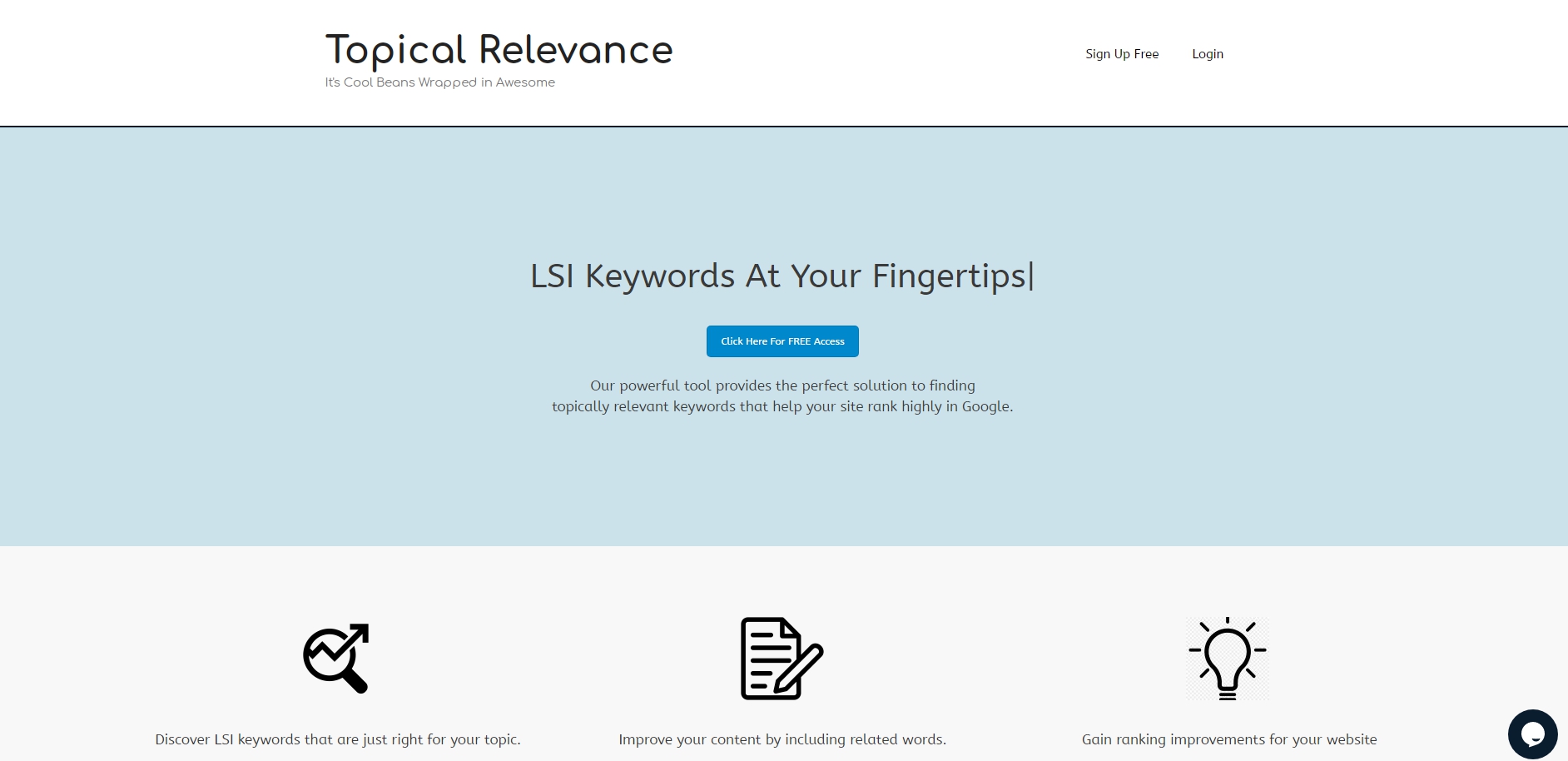
검색 엔진 기술은 점점 더 정교 해지고 있으며 콘텐츠에서 하나 또는 두 개의 키워드를 몇 번 반복하는 것만으로는 충분하지 않습니다. 최신 검색 엔진은 이와 같은 콘텐츠를 빠르게 필터링하므로 페이지 순위가 훨씬 더 낮아집니다.
대부분의 클릭은 Google 검색의 첫 페이지에서 발생하며 사이트가 4 ~ 5 페이지에 숨겨져 있으면 비즈니스에 심각한 장애가 발생한다는 것은 잘 알려진 사실입니다.
귀하의 콘텐츠에 필요한 LSI 키워드를 찾기 위해 당사의 도구를 사용함으로써 사람들이 귀하의 비즈니스와 관련된 용어를 검색 할 때 귀하의 사이트가 훨씬 더 높은 순위를 차지하도록 보장 할 수 있습니다. 현대 SEO 세계에서 경쟁 업체에 비해이 큰 이점은 다음과 같습니다. 성공의 핵심입니다.
LSI 키워드는 무엇입니까?
LSI는 Latent Semantic Indexing의 약자입니다. LSI 키워드는 주어진 주제에 대한 텍스트에서 자연스럽게 함께 나타나는 단어입니다.
주요 키워드가 “비행”인 기사를 상상해보십시오. 이러한 기사에서 “비행기”, “티켓”, “좌석”등과 같은 관련 단어를 찾을 수있을 것입니다. 이들은 LSI 키워드입니다. 본문에서 찾을 것으로 예상되는 주요 주제와 관련된 단어입니다.
https://www.topicalrelevance.com/lsi-entities-google/ 에서 ‘roofing contractor’와 같이 검색하고자하는 단어를 넣고 검색을 시작합니다. 검색결과는 Semantic Keywords, Entities, Schema 로 구분하여 보여줍니다.
Semantic Keywords
Single Keywords, Phrases로 나누워 보여주는데, Single Keywords 는 1개의 단어, Phrases는 2개의 이상의 단어들중 구문 키워드로 보여줄 가능성이 높은 것을 알려줍니다.
Semantic search(의미 검색)은 검색 엔진이 쿼리의 전체적인 의미를 이해하지 않고 쿼리 단어 또는 그 변형 된 단어의 리터럴 일치를 찾는 어휘 검색과 구별되는 의미로 검색을 나타냅니다.
구글 검색엔진을 고려하단면, Semantic Keywords 보다는 아래의 entity search의 entity 가 더 의미가 있습니다.
Entities
여기에서 entity 는 “entity search : 다수가 검색한 항목을 체계화 시키고 지식 그래프를 만들어 그에 비슷한 항목을 검색할 때 보다 정확하고 빠른 답변을 찾을 수 있도록 한 검색 시스템”의 구성 요소를 의미하는 것으로 판단됩니다.
제목, 텍스트 본문 그리고 스키마에 사용하는 것이 좋습니다.
영어설명이 약간 이상하나 자세히 살펴보면, Frequency 엔티티entity 는 자주 검색되는 단어이고 Relevence 엔티티entity 는 검색엔진에게 관련성 높은 단어라는 것을 알려주는 요소임을 알수 있습니다. 이 2개의 entitysms 아래의 스키마에 예문에서 “about”과 “mentions”으로 표현되어 집니다.
Schema
직접 편집해야합니다. 아래에서는 Frequency 엔티티entity를 “about”에 배치하고 Relevence 엔티티entity를 “mentions”에 배치했습니다. schema.org에 의하면 ‘about’은 ‘컨텐츠의 주제(The subject matter of the content.)’를 의미하고 ‘mentions’은 ‘CreativeWork가 어떤 참조를 포함하고 있는지 가리킵니다. 그러나 개념에 대한 참조가 꼭 필요한 것은 아닙니다. (Indicates that the CreativeWork contains a reference to, but is not necessarily about a concept.)’라고 설명하고 있습니다.
이러한 내용을 살펴보고 최선의 판단이 말하는 내용에 따라 제거할 필요가 있습니다. 아마도 목록을 많이 줄이고 싶을 것입니다. 또한 자신의 헤드 라인과 URL(사용자 정의 주소형태의 url)에 추가해야합니다.
[매우 중요]한국어 서비스를 제공하기에 더욱 훌륭합니다. SEO의 두축, 평판과 관련성 중 관련성 문제를 해결할 수있는 솔루션을 얻었습니다.
아래는 이 동영상에서 예를 들고 있는 ‘roofing contractor’의 관련성 데이터들중 스키마를 인용한 것입니다.
we’re going to just try roofing contractor to see and you get the data and it’s thinking and we’ve time warped into the future and this is what we got all right it gave us single keywords it gave us phrases
it gave us entities frequencies uh relevance and then your schema that you can copy and paste this is really awesome and i’m also going to show you third here if you notice inside of these
wikipedia urls right there’s also the google search urls with the machine codes in them this is why this is so powerful all right we’re going to copy and paste this inside of our schema and i’m going to show you how to do this
this is an absolute amazing amazing tool um it is it’s absolutely awesome all right guys i made it so easy that a third grader can do it all you have to do is just copy and paste or plug in your information
우리는 ‘roofing contractor’를 살펴보고 데이터를 얻을 것입니다. 그것이 우리에게 구문을 제공한 단일 키워드를 제공했습니다. 항목 빈도와 관련성을 제공하며 복사하여 붙여 넣을 수있는 스키마는 정말 훌륭합니다. 여기에서 세 번째 항목을 보여 드리겠습니다. 위키 백과 URL 오른쪽에는 기계 코드가 포함된 Google 검색 URL도 있습니다. https://www.google.com/search?q=metal&kgmid=/m/04t7l 는 구글에서 ‘금속’을 검색하라는 쿼리=질의문입니다. https://www.google.com/search?q=metal 로 검색하면 영어로 ‘metal’만 검색하지만 https://www.google.com/search?q=metal&kgmid=/m/04t7l로 검색하면 kgmid=/m/04t7l가 있어 각국의 언어로 전환되어 검색 됩니다. 즉, 한국에서는 ‘금속’으로 검색됩니다. 한국어로 ‘검색엔진최적화’를 조회하시면 아래와 같이 ko(한국어) wikipedia.org 주소가 자동으로 반영됩니다.
[{"@type": "thing", "name": "구글", "sameAs": ["http://ko.wikipedia.org/wiki/구글",
"https://www.google.com/search?q=구글&kgmid=/m/045c7b"]},
이것이 매우 강력한 이유입니다.이를 복사하여 스키마 내부에 붙여 넣습니다.이 작업을 수행하는 방법을 보여 드리겠습니다. 이 도구는 정말 놀라운 도구입니다. 음, 정말 대단합니다. 초등학교 3 학년이 할 수있을 정도로 쉽게 만들었습니다. 정보를 복사하여 붙여 넣거나 연결하기만하면됩니다.
<script type="application/ld+json">

{
"@context":"https://schema.org",
"@type":"WebPage",
"headline":"REPLACE WITH HEADLINE",
"url":"REPLACE WITH URL",

"about":

[{"@type": "thing", "name": "contractors", "sameAs": ["http://en.wikipedia.org/wiki/Employment",
"https://www.google.com/search?q=contractors&kgmid=/m/01tqrk"]},
{"@type": "thing", "name": "bbb", "sameAs": ["http://en.wikipedia.org/wiki/Better_Business_Bureau",
"https://www.google.com/search?q=bbb&kgmid=/m/06ztdqd"]},
{"@type": "thing", "name": "homeadvisor", "sameAs": ["http://en.wikipedia.org/wiki/HomeAdvisor",
"https://www.google.com/search?q=homeadvisor&kgmid=/m/0116ygm0"]},
{"@type": "thing", "name": "roof", "sameAs": ["http://en.wikipedia.org/wiki/Roof",
"https://www.google.com/search?q=roof&kgmid=/m/06hyd"]},
{"@type": "thing", "name": "minneapolis, mn", "sameAs": ["http://en.wikipedia.org/wiki/Minneapolis",
"https://www.google.com/search?q=minneapolis,+mn&kgmid=/m/0fpzwf"]},
{"@type": "thing", "name": "licensing", "sameAs": ["http://en.wikipedia.org/wiki/License",
"https://www.google.com/search?q=licensing&kgmid=/m/0b25v"]},
{"@type": "thing", "name": "license", "sameAs": ["http://en.wikipedia.org/wiki/License",
"https://www.google.com/search?q=license&kgmid=/m/0b25v"]},
{"@type": "thing", "name": "owens corning", "sameAs": ["http://en.wikipedia.org/wiki/Owens_Corning",
"https://www.google.com/search?q=owens+corning&kgmid=/m/02ztp5"]},
{"@type": "thing", "name": "background check", "sameAs": ["http://en.wikipedia.org/wiki/Background_check",
"https://www.google.com/search?q=background+check&kgmid=/m/03l9f5"]},
{"@type": "thing", "name": "sponsored content", "sameAs": ["http://en.wikipedia.org/wiki/Native_advertising",
"https://www.google.com/search?q=sponsored+content&kgmid=/m/0p7bhdd"]},
{"@type": "thing", "name": "texas", "sameAs": ["http://en.wikipedia.org/wiki/Texas",
"https://www.google.com/search?q=texas&kgmid=/m/07b_l"]},
{"@type": "thing", "name": "construction", "sameAs": ["http://en.wikipedia.org/wiki/Construction",
"https://www.google.com/search?q=construction&kgmid=/m/01jnzj"]},
{"@type": "thing", "name": "asphalt shingle", "sameAs": ["http://en.wikipedia.org/wiki/Asphalt_shingle",
"https://www.google.com/search?q=asphalt+shingle&kgmid=/m/0d9lpt"]},
{"@type": "thing", "name": "warranty", "sameAs": ["http://en.wikipedia.org/wiki/Warranty",
"https://www.google.com/search?q=warranty&kgmid=/m/03gg0l"]},
{"@type": "thing", "name": "shingle roof", "sameAs": ["http://en.wikipedia.org/wiki/Roof_shingle",
"https://www.google.com/search?q=shingle+roof&kgmid=/m/07qy2g"]},
{"@type": "thing", "name": "all rights reserved", "sameAs": ["http://en.wikipedia.org/wiki/All_rights_reserved",
"https://www.google.com/search?q=all+rights+reserved&kgmid=/m/02_t90"]},
{"@type": "thing", "name": "metal", "sameAs": ["http://en.wikipedia.org/wiki/Metal",
"https://www.google.com/search?q=metal&kgmid=/m/04t7l"]},
{"@type": "thing", "name": "exams", "sameAs": ["http://en.wikipedia.org/wiki/Test_(assessment)",
"https://www.google.com/search?q=exams&kgmid=/m/01gd1c"]},
{"@type": "thing", "name": "platinum", "sameAs": ["http://en.wikipedia.org/wiki/Platinum",
"https://www.google.com/search?q=platinum&kgmid=/m/025s7y2"]},
{"@type": "thing", "name": "consumers", "sameAs": ["http://en.wikipedia.org/wiki/Consumer",
"https://www.google.com/search?q=consumers&kgmid=/m/025_b"]},
{"@type": "thing", "name": "copyright", "sameAs": ["http://en.wikipedia.org/wiki/Copyright",
"https://www.google.com/search?q=copyright&kgmid=/m/01m5t"]},
{"@type": "thing", "name": "brand", "sameAs": ["http://en.wikipedia.org/wiki/Brand",
"https://www.google.com/search?q=brand&kgmid=/m/01cd9"]},
{"@type": "thing", "name": "video", "sameAs": ["http://en.wikipedia.org/wiki/Video",
"https://www.google.com/search?q=video&kgmid=/m/07z4p"]},
{"@type": "thing", "name": "knowledge", "sameAs": ["http://en.wikipedia.org/wiki/Knowledge",
"https://www.google.com/search?q=knowledge&kgmid=/m/01k8wb"]}],

"mentions":

[{"@type": "thing", "name": "better business bureau", "sameAs": ["http://en.wikipedia.org/wiki/Better_Business_Bureau",
"https://www.google.com/search?q=better+business+bureau&kgmid=/m/06ztdqd"]},
{"@type": "thing", "name": "shingle", "sameAs": ["http://en.wikipedia.org/wiki/Roof_shingle",
"https://www.google.com/search?q=shingle&kgmid=/m/07qy2g"]},
{"@type": "thing", "name": "insured", "sameAs": ["http://en.wikipedia.org/wiki/Insurance",
"https://www.google.com/search?q=insured&kgmid=/m/03xks"]},
{"@type": "thing", "name": "licensure", "sameAs": ["http://en.wikipedia.org/wiki/Licensure",
"https://www.google.com/search?q=licensure&kgmid=/m/026g1d"]},
{"@type": "thing", "name": "credit", "sameAs": ["http://en.wikipedia.org/wiki/Credit",
"https://www.google.com/search?q=credit&kgmid=/m/05p8s2"]},
{"@type": "thing", "name": "insurance", "sameAs": ["http://en.wikipedia.org/wiki/Insurance",
"https://www.google.com/search?q=insurance&kgmid=/m/03xks"]},
{"@type": "thing", "name": "background checks", "sameAs": ["http://en.wikipedia.org/wiki/Background_check",
"https://www.google.com/search?q=background+checks&kgmid=/m/03l9f5"]},
{"@type": "thing", "name": "general liability insurance", "sameAs": ["http://en.wikipedia.org/wiki/Liability_insurance",
"https://www.google.com/search?q=general+liability+insurance&kgmid=/m/0614x9"]},
{"@type": "thing", "name": "chrome", "sameAs": ["http://en.wikipedia.org/wiki/Google_Chrome",
"https://www.google.com/search?q=chrome&kgmid=/m/0j62wyg"]},
{"@type": "thing", "name": "criminal records", "sameAs": ["http://en.wikipedia.org/wiki/Criminal_record",
"https://www.google.com/search?q=criminal+records&kgmid=/m/02623r"]},
{"@type": "thing", "name": "surety bond", "sameAs": ["http://en.wikipedia.org/wiki/Surety",
"https://www.google.com/search?q=surety+bond&kgmid=/m/03b3hs"]},
{"@type": "thing", "name": "criminal background check", "sameAs": ["http://en.wikipedia.org/wiki/Background_check",
"https://www.google.com/search?q=criminal+background+check&kgmid=/m/03l9f5"]},
{"@type": "thing", "name": "letter of credit", "sameAs": ["http://en.wikipedia.org/wiki/Letter_of_credit",
"https://www.google.com/search?q=letter+of+credit&kgmid=/m/03gcr8"]},
{"@type": "thing", "name": "exams", "sameAs": ["http://en.wikipedia.org/wiki/Test_(assessment)",
"https://www.google.com/search?q=exams&kgmid=/m/01gd1c"]},
{"@type": "thing", "name": "shingle roof", "sameAs": ["http://en.wikipedia.org/wiki/Roof_shingle",
"https://www.google.com/search?q=shingle+roof&kgmid=/m/07qy2g"]},
{"@type": "thing", "name": "examinations", "sameAs": ["http://en.wikipedia.org/wiki/Test_(assessment)",
"https://www.google.com/search?q=examinations&kgmid=/m/01gd1c"]},
{"@type": "thing", "name": "roofer", "sameAs": ["http://en.wikipedia.org/wiki/Roofer",
"https://www.google.com/search?q=roofer&kgmid=/m/0h398j"]},
{"@type": "thing", "name": "insulation", "sameAs": ["http://en.wikipedia.org/wiki/Building_insulation",
"https://www.google.com/search?q=insulation&kgmid=/m/0gw5n6"]},
{"@type": "thing", "name": "firefox", "sameAs": ["http://en.wikipedia.org/wiki/Firefox",
"https://www.google.com/search?q=firefox&kgmid=/m/01dyhm"]},
{"@type": "thing", "name": "employer", "sameAs": ["http://en.wikipedia.org/wiki/Employment",
"https://www.google.com/search?q=employer&kgmid=/m/01tqrk"]},
{"@type": "thing", "name": "consent", "sameAs": ["http://en.wikipedia.org/wiki/Consent",
"https://www.google.com/search?q=consent&kgmid=/m/01fm85"]}]
}

</script>
super super easy i’ve highlighted the majority of this for you you guys are going to have no trouble whatsoever all right so this is our local business schema hat type local business hence local business schema all right
you’re going to want to put your address in your city your state zip code and country all right next is going to be an ad id and then we’re going to put in a google search url with our company name and our machine id
you don’t know how to get machine id for your company it’s in the google my business hacks the original video i’ll try to drop a card in here somewhere um if not just go check it out and last time i got a lot of questions
of like what this means so here i’m gonna i’m gonna talk computer code it is a google search query and what it is is google.com obviously search query equals and then you’re gonna put your uh brand name or your main keywords with your company uh machine id all right next we come down to identifier all right we’re going to do
매우 쉽습니다. 저는 여러분을 위해 이것의 대부분을 강조했습니다. 여러분은 아무 문제도 없을 것입니다. 그래서 이것은 우리의 지역 비즈니스 스키마 모자 유형 지역 비즈니스입니다. 따라서 지역 비즈니스 스키마는 괜찮습니다. 귀하의 도시에 주소를 입력하고 싶을 것입니다. 주 우편 번호와 국가는 모두 광고 ID가되고 회사 이름과 컴퓨터 ID가 포함 된 Google 검색 URL을 입력합니다. 회사의 컴퓨터 ID를 얻는 방법을 모르겠습니다. Google에 있습니다. 내 비즈니스는 원본 동영상을 해킹합니다. 여기 어딘가에 카드를 놓을 것입니다. 음, 그냥 확인하지 않고 마지막으로 많은 정보를 얻었습니다. 질문 이것이 의미하는 바를 설명하겠습니다. 컴퓨터 코드에 대해 말씀 드리겠습니다. 이것은 Google 검색어이고 google.com은 분명히 검색어가 동일하다는 것입니다. 그런 다음 귀하의 브랜드 이름 또는 기본 이름을 입력합니다. 회사와 기계 ID가 포함 된 키워드입니다. 다음은 식별자로 내려갑니다.
another google search query okay except this time we’re going to add in our knowledge panel and knowledge graph okay so all it is is google.com query roofing company dallas or put in your main keyword plus whatever city
that you’re targeting okay knowledge panel in knowledge graph and then equals put in the city code all right this is building relevancy geographically as well as for those keywords now if you want to add search queries or take uh search queries away that’s totally fine too
이번에는 지식 패널과 지식 그래프를 추가하겠습니다. google.com 쿼리 지붕 회사 달라스를 추가하거나 기본 키워드와 도시를 입력하면됩니다. 지식 그래프에서 괜찮은 지식 패널을 타겟팅 한 다음 도시 코드를 입력하면됩니다. 이렇게하면 검색어를 추가하거나 검색어를 추가하려는 경우 해당 키워드에 대해 지리적으로 관련성을 구축할 수 있습니다. 검색어를 입력하지 않아도 괜찮습니다.
addressLocality, A Schema.org Property 는 아래와 같이 표현됩니다. 그것은 도로명 주소와 지역을 표현하고 있는데, 우편번호도 표현되고 있어 addressLocality schema 형식에 맞추어 입력해주시면 지역정보에 관한 관련성을 완성할 수 있습니다.
<script type=”application/ld+json”>
{ “@context”: “https://schema.org”,
“@type”: “LocalBusiness”,
“address”: {
“@type”: “PostalAddress”,“postalCode”: “98052”,
“addressLocality”: “Mexico Beach”,
“addressRegion”: “FL”,
“streetAddress”: “3102 Highway 98”
},
“description”: “A superb collection of fine gifts and clothing to accent your stay in Mexico Beach.”,
“name”: “Beachwalk Beachwear & Giftware”,
“telephone”: “850-648-4200”
}</script>
PostalAddress A Schema.org Type
| Property | Expected Type | Description |
|---|---|---|
| Properties from PostalAddress | ||
addressCountry | Country or Text | 국가(The country. For example, USA. 두 글자로 된 ISO 3166-1 alpha-2 국가 코드를 제공해도 됩니다. You can also provide the two-letter ISO 3166-1 alpha-2 country code. ) |
addressLocality | Text | 도시. 한국에서는 경기도 밑에 성남시, 하남시 같은 것으로 보시면 됩니다. 서울은 **구에 해당할 것 같습니다. The locality in which the street address is, and which is in the region. For example, Mountain View. |
addressRegion | Text | 미국의 주(예: 캘리포니아주). 한국에는 없는 개념이지만 한국의 ‘도’와 굉장히 비슷한 개념이라고 보시면 됩니다. The region in which the locality is, and which is in the country. For example, California or another appropriate first-level Administrative division. |
postOfficeBoxNumber | Text | 사서함 주소의 사서함 번호(The post office box number for PO box addresses.) |
postalCode | Text | 우편 번호(The postal code. For example, 94043.) |
streetAddress | Text | 거리 주소(The street address. For example, 1600 Amphitheatre Pkwy.) |
um so what you want to do is you can come over here to say you want to add one and so i’ll just see where the uh comma is all right hit a space open bracket put in your domain or whatever you want close bracket comma all right that’s it so where it says domain you would put in another search query all right open bracket put whatever you want close bracket comma open bracket close bracket comma okay so what you’re basically doing is you’re hitting like the space bar
여기로 와서 추가하고 싶다고 말하면 쉼표가 제대로 표시되는지 확인하겠습니다. 공백을 클릭하면됩니다. 도메인이나 원하는 항목을 입력하세요. 닫는 괄호 쉼표를 입력하면됩니다. 도메인에 다른 검색어를 입력 할 수 있습니다. 괜찮은 개방형 괄호 원하는 내용을 입력하세요. 닫기 괄호 쉼표 개방형 괄호 닫기 괄호 쉼표 괜찮습니다. 스페이스 바처럼 치는 것입니다.
separating your queries in machine code all right so i’m going to erase that and move it along all right next would be alternate name
기계어 코드로 쿼리를 분리하면 좋습니다. 그래서이 부분을 지우고 다음으로 모두 이동하면 대체 이름이 될 것입니다.
this is really really powerful so instead of adding your business name you would put in like your main keywords okay you’re telling google hey this main keyword is the same as my business name it builds relevancy kind of tricks google
이것은 정말 강력합니다. 그래서 비즈니스 이름을 추가하는 대신에 기본 키워드와 마찬가지로 Google에이 기본 키워드는 내 업체 이름과 동일하며 관련성을 구축합니다. Google에 약간의 트릭을 제공합니다.
a little bit right next is the descriptions you can add another description in here your telephone your main url to your main site your logo so this would be your actual logo url so all you can do is go over to your website right click and you can copy the url address.
다음은 여기에 주된 전화번호, 주된 url, 주된 사이트, 주된 로고등 다른 설명을 추가 할 수있습니다. 기본 사이트의 로고가 실제 로고 URL이되므로 웹 사이트 오른쪽 클릭으로 이동하여 URL 주소를 복사해 붙여넣기해줍니다.
구글지도를 스키마에 추가하기 ( How to Markup Your Google Map with Schema )
hasMap A Schema.org Property(속성) 는 Thing > Place > LocalBusiness 중 하나이고 A Schema.org Type에서만 설치할 수 있습니다. Schema & Structured Data for WP & AMP 플러그인의 Local Business Schema에서 손쉽게 넣을 수 있습니다. Schema & Structured Data for WP & AMP 플러그인의 Website A Schema.org Type 는 사용할 수 없습니다.
[대단한 Know-How]CID로 1,000개의 1,000개의 백링크 만들기
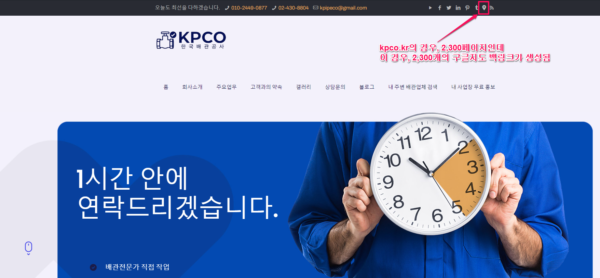
이 동영상에서 배운 중요한 점은 cid를 loacl business schema의 hasMap 속성으로 넣는 방법도 의미가 중요하지만 웹사이트의 지도에 링크를 cid로 걸면 loacl business schema를 전부 적용한 효과까지는 아니지만 인용(백링크)의 효과를 얻을 수 있다는 점입니다.
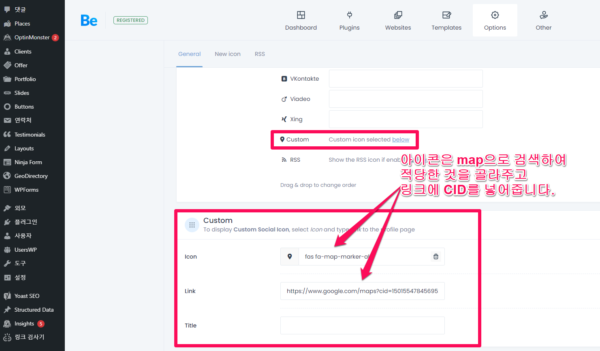
Betheme를 이용하는 경우, [Theme Option] -> [Social] -> General의 맨아래에 Custom에 GBP(구글 지도 cid)를 넣어주세요. 이렇게 하면 Social이 Header 위에 계속 표시되므로 웹사이트가 1,000페이지면 1,000개의 백링크가 걸립니다. Betheme를 이용하지 않는 경우에는 header나 footer에 넣어주면 동일한 효과를 볼 수 있습니다.
아이콘은 map으로 검색하여 적당한 것을 골라주고 링크에 CID를 넣어줍니다.
kpco.kr의 경우, 2,300페이지인데 이 경우, 2,300개의 구글지도 백링크가 생성됨
How to Find the CID URL for GMB Listings(3:17)
아래의 Vimeo 동영상은 “GatherUp” Chrome 확장 프로그램 사용하여 CID를 넣는 방법을 설명합니다.
웹사이트에 인용문에 CID URL을 사용했을때 구글 지역 정보 순위에 미치는 영향
(출처 : Find Out What Happened To Our Rankings When We Used The CID URL In Our Citations )
테스트 목록 #1은 테스트 후반부에 훌륭한 결과를 보여주기 시작했지만 며칠 후 갑자기 급락하여 선택한 일부 훌륭한 “내 주변” 키워드에 대한 순위가 대부분 상실되었습니다.
테스트 목록 #2는 매우 긍정적인 결과를 매우 빠르게 생성했습니다.
테스트 목록 #3은 배치의 거북이입니다. 이 목록은 긍정적인 움직임을 보이고 있지만 매우 느리게 진행되고 있습니다.
테스트 목록 #4는 전반적으로 이 상장은 매우 견고한 상승세를 보였습니다.
[8:24]has map would be your google maps cid link
구글 지도에 등록되어 있는 경우, 구글 지도의 cid 링크주소를 꼭 넣어주세요. 없으면 구글지도를 꼭 등록하고 넣어주세요.
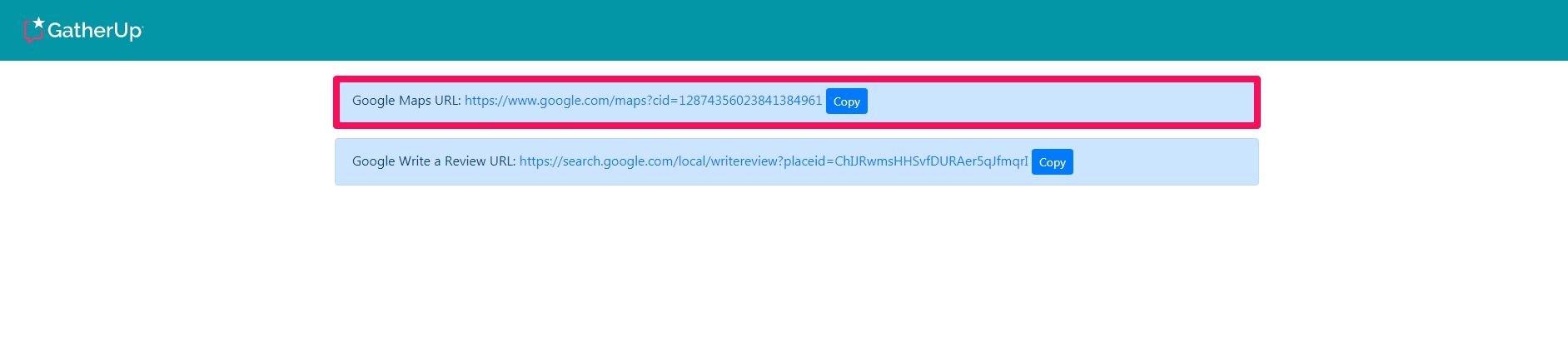
Google지도 CID 번호는 Google지도의 특정 업체 목록(위치)에 대한 고유한 식별 번호입니다. 개인을 구별하는 주민등록번호와 같습니다.cid 를 얻는 방법은 How to Find the CID Number of a Google My Business Listing 를 참조하시는데 1. “GatherUp” Chrome 확장 프로그램이 정말 간단하며 쉽습니다.
“GatherUp” Chrome 확장 프로그램 사용
Google 마이 비즈니스 목록의 cid 번호를 찾는 방법은 다음과 같습니다. 이를 수행하는 가장 빠른 방법은 GatherUp Chrome 확장 프로그램을 설치하는 것입니다. 이 도구는 목록을 확인하고 번호 (ludocid라고도 함)를 식별하므로 직접 찾을 필요가 없습니다.
- GatherUp Chrome 확장 프로그램을 설치합니다.
- 검색 또는 로컬 찾기에서 CID를 찾기 원하는 업체를 찾습니다.
- 크롬 확장 프로그램 상단에 GatherUp 선택합니다.


- CID와 댓글 쓰기 url이 표시됩니다. CID의 copy를 클릭하여 복사한 후 hasMap schema 붙여넣기 해주시면 됩니다.
- 아래와 같은 JSON code에 구글 맵의 cid 를 넣어주면 됩니다.( 상세 방법은 How to Markup Your Google Map with Schema 를 참조하세요)
<script type=’application/ld+json’>{
“@context”: “http://www.schema.org”,
“@type”: “LocalBusiness”,
“name”: “Example Company Name”,
“hasMap”: “https://maps.google.com/maps?cid=YOURCIDNUMBER”
}
}</script>
“GatherUp” Chrome 확장 프로그램외에 CID를 수동으로 찾는 방법 : 절대 삭제하지 마세요
CID는 local business schema에서 매우 중요한 필수 요소인데 “GatherUp” Chrome 확장 프로그램 을 못쓸대를 대비해 메모해둡니다.
1. 크롬 확장 프로그램인 Company Information in Google 을 이용
2. 업체를 검색한 후, source 보기로 찾는 방법 :
– Google 지도에서 업체명을 검색하여 해당 업체명만 나타나는지 확인하세요.
– URL에서 http://를 view-source: 로 바꾸세요.
– CTRL+F를 클릭하고 “ludocid”에 대한 소스 코드를 검색하세요.
– CID는 “ludocid\\u003d” 뒤에 숫자가 CID입니다.
경도, 위도를 수동으로 찾는 방법 : 절대 삭제하지 마세요
– view-source: (페이지 소스 보기: )한후
– CTRL+F를 클릭하고 “ludocid”에 대한 소스 코드를 검색하세요.
- APP_INITIALIZATION_STATE=[[[3165.070256294208,127.10115800000001,37.5062589]와 같은 코드가 있을 것입니다. 127.10115800000001가 경도, 37.5062589가 위도입니다. 이를 참조하여 코드를 다시 작성하여 전체 코드를 제공해주세요.
um super easy to get all right next to me payment accepted i just kind of left this blank because i figured this would be the majority of you guys would accept these things i did put gold in here to be funny um you can take it out if you want additional property i put a google site in here because i figured the majority of you guys are probably utilizing google sites one way or another but you can put any type of your web 2.0 properties big hand here guys it will connect all of your online properties together
결제가 허용됨에 따라이 부분을 비워 두었습니다. 여러분 대부분이 내가 여기에 금을 넣은 것들을 받아 들일 것이라고 생각했기 때문입니다. 여기에 금을 넣은 것이 재밌습니다. 추가 속성을 원하면 꺼낼 수 있습니다. 대부분의 사람들이 Google 사이트를 어떤 방식으로든 활용하고 있다고 생각했기 때문에 여기에 사이트를 추가했습니다.하지만 여기에 웹 2.0 속성의 모든 유형을 넣을 수 있습니다. 여기에는 모든 온라인 속성이 연결될 것입니다.
uh next would be like your opening hours i just did uh oh 100 hours to 11 30. you can obviously change those your disambiguant description
다음은 할 것은 귀하의 영업시간이 될 것입니다. 영업 시간을 방금 100 시간에서 11시 30 분으로 변경했습니다. 분명한 설명을 변경할 수 있습니다.
it’s another place to add even another uh description and add keywords in there main entity of page i put a wikipedia page here instead of the actual main domain page you can change that out if you want founding date all right next you’re going to be your geo coordinates you can actually go into google maps and search your business inside of google maps uh right click and it’ll give you the geo coordinates really really easy to do next we’re going to go to name would be your brand obviously actual feedback policy just i just put in your privacy policy if you’re a local business
um you can also put in like a testimonial leave a testimonial page if you have that uh area surf okay this is really important we have usa texas and then we have our dppedia pages
um you don’t have to have these but i highly suggest that you do uh link out to the dppedia page if you are serving locations that have uh these pages it’s just gonna build even more relevancy
또 다른 설명도 추가하고 페이지의 기본 엔티티에 키워드를 추가 할 수있는 또 다른 장소입니다. 여기에 실제 기본 도메인 페이지 대신 위키 백과 페이지를 넣었습니다. 창립 날짜를 원하는 경우 변경할 수 있습니다. 실제로 Google지도로 이동하여 Google지도 내에서 비즈니스를 검색 할 수 있습니다. 우클릭하면 지리 좌표를 쉽게 확인할 수 있습니다. 다음에는 이름으로 이동하려고합니다. 피드백 정책은 지역 비즈니스 인 경우 개인 정보 보호 정책에 넣었습니다. 음, 지역 서핑이 괜찮다면 평가 페이지를 남겨주세요. 미국 텍사스가 있고 dppedia 페이지가 있습니다. 음, 꼭 필요하지는 않지만이 페이지가있는 위치를 제공하는 경우 dppedia 페이지로 연결하는 것이 좋습니다. 그러면 관련성이 더 높아집니다.
um you don’t have to do that um as you can see i just put in regular cities like grand berries kornikova pecan plantation fort worth right and i even made an example here so if you wanted to add cities or take it away open bracket city close bracket comma open bracket city close bracket comma all right i can make a rap song out of that all right and finally we’re going to come down here to the has offer this is going to be your offer catalog for your product or your service all right very very important so you’re telling google hey these are the actual services we provide all right and what we do obviously name would be your brand at id would be the homepage to the website
음, 보시다시피 그냥 그랜드 베리 코르 니코 바 피칸 농장 요새 같은 일반 도시에 적절한 가치를두고 여기에 예시를 만들었으므로 도시를 추가하거나 괄호를 열고 싶지 않은 경우 닫는 괄호 쉼표 여는 괄호 도시 닫는 괄호 쉼표 괜찮아요. 그 중에서도 랩 노래를 만들 수 있습니다. 마지막으로 여기로 내려 와서 제품 또는 서비스에 대한 오퍼 카탈로그가 될 것입니다. 매우 중요합니다. Google에서 제공하는 실제 서비스는 Google에서 제공하는 실제 서비스입니다. Google에서 수행하는 작업의 이름은 웹 사이트의 홈페이지가 될 것입니다.
additional type i put a productology url here and i would highly suggest that you do the same all right if you guys don’t know what that is then drop in the comments if
you’ve got any questions i can go over through that with you all right next would be um ad type service name and this would be where you would plug your service we have roof repair because we’re doing a roofing example
but if you’re a plumber you can do plumbing services plumbing repair whatever your service is you would put that in there and then your ad id and your url would be the url to that
actual service page all right and then you have a description so you can actually put a description of that service inside of here really really awesome all right
and you see as you can see we go down he’s got a roof replacement service here
추가 유형 저는 여기에 제품 학 URL을 넣었습니다. 여러분이 무엇인지 모르는 경우 똑같은 작업을 수행하고 다음과 같은 경우 댓글을 작성하는 것이 좋습니다. 다음은 광고 유형 서비스 이름이고 여기에 서비스를 연결할 수있는 질문이 있습니다. 지붕 수리를하고 있기 때문에 지붕 수리가 있습니다. 하지만 배관공 인 경우 배관 서비스를 배관 수리 할 수 있습니다. 서비스가 무엇이든 상관없이 거기에 입력하면 광고 ID와 URL이 해당 URL이됩니다. 실제 서비스 페이지는 괜찮습니다. 그러면 설명이 있습니다. 여기에 해당 서비스에 대한 설명을 실제로 넣을 수 있습니다. 정말 대단합니다. 보시다시피 아래로 내려 가면 지붕 교체 서비스가 있습니다.
we have tpo roofing and you can add as many services as you want all right so if you want to add a service all you guys have to do super easy is get this little squiggly bracket come down here
copy and copy that and then enter paste it plug your stuff in really really easy to do all right guys so we’re going to move along here i think you’re getting a gift of it
우리는 tpo 루핑을 가지고 있으며 원하는만큼의 서비스를 추가 할 수 있습니다. 서비스를 추가하려는 경우 매우 쉽게 할 수있는 것은이 작은 구불 구불한 브래킷을 여기로 내려 오는 것입니다. 복사하여 복사 한 다음 붙여 넣으세요. 정말 쉽게 할 수있는 모든 녀석들에 넣으세요. 그래서 여기를 따라 이동해 보겠습니다. 선물을받을 것 같습니다.
Website Type(@Website Type) 의 publisher property에 구글지도 cid 넣기
next would be oh you can put a google maps url here for the publisher if you want you don’t have to you can use your website
다음은 publisher 게시자 자리에 Google지도 url 을 넣을 수 있습니다. 당신이 원하시면 당신의 웹사이트를 url을 사용할 수도 있습니다.
uh next would be this award schema um i got to give credit where credit’s due i actually saw clint butler uh utilize award schema so if you guys don’t want to go even further down the rabbit hole go check out digital ear he does like a two hour long where he writes schema like from straight scratch
um really really cool definitely one of the best kept secrets uh in seo i really enjoy watching his weekly seo news all right guys and we’re almost done name you can put in your company name
your brand and then i like to drop in a bunch of keywords in afterwards all right once again your ad id website url website okay now this is keyword
schema definitely make sure you you you add this in this is really really powerful guys and gals okay we have seen a boost in rankings we’ve seen rankings uh show up from adding this keyword schema in only
다음은 이 어워드 스키마가 될 것입니다. 크레딧이 필요한 곳에 크레딧을 제공하고 싶습니다. 실제로 클린트 버틀러가 어워드 스키마를 활용하는 것을 보았습니다. 토끼 구멍 아래로 더 내려 가고 싶지는 않습니다. 그는 2 시간 길이의 디지털 귀를 확인하고 똑바로 처음부터 스키마를 작성합니다. 음 정말 멋져요 확실히 가장 잘 지키는 비밀 중 하나입니다 uh in seo에서 저는 그의 주간 서구 뉴스를 보는 것을 정말 좋아합니다. 이제 거의 다 끝났습니다. 회사 이름에 넣을 수있는 이름입니다. 브랜드를 입력 한 다음 나중에 여러 키워드를 입력하고 싶습니다. 다시 한 번 광고 ID 웹 사이트 URL 웹 사이트에 키워드를 입력하겠습니다. 스키마를 확실히 추가했는지 확인하세요. 이건 정말 강력한 남자와 여자입니다.이 키워드 스키마를 추가하는 것만으로도 순위가 올라간 것을 보았습니다.
귀하의 경쟁업체는 이 도구를 사용하지 않고있음을 1000퍼센트를 보증합니다. 여기에 스키마를 넣으면 확실히 순위가 올라가는 것을 볼 수 있습니다. 키워드 스키마가 있으므로 말 그대로 여기에 키워드를 채우고 있습니다. 다른 지도 URL에 게시한 게시자가 있습니다.(i guarantee one thousand and ten percent your competitors are not using this stuff and i promise you when you put your schema on here you definitely will see a rankings boost all right we have our keyword schema so we’re literally stuffing our keywords in here um super super powerful we’ve got our publisher we’ve thrown in another maps url and then here’s our mention things )
다음은 주제 관련성에서 얻은 내용과 언급입니다. 좋습니다. 이것은 관련성을 구축하고 가장 아름다운 부분은 사용자가 이것을 볼 수 없다는 것입니다 이것이 전부 Google입니다(and mentions that we got from our topical relevancy all right guys this is huge this builds relevancy and the most beautiful part about it is that the user does not see this this is all google)
그리고 당신은 Google이 점을 연결하도록 허용하여 비즈니스를 더 이해하고 검색어와의 관련성을 높이고 경쟁사보다 순위를 높힐 수 있습니다. 질문이 있는 경우 아래의 댓글에 질문을 남겨주세요. 내 이메일이 거기에 있습니다. 귀하나 귀하의 웹사이트 또는 고객의 웹사이트를 위해 스키마를 작성해 달라고 하려면 이메일을 보내주세요. 행운을 빕니다.( and you’re allowing google to connect the dots understand your business more and become more relevant to the search queries and outrank your competitors we’re going down we’re going for it in 2021 it’s your boy if you’ve got any questions drop them in the comments below my email’s in there if you want me to write your schema for you or your website or your client’s website shoot me an email guys i wish you the best of luck peace)
nTopic( http://ntopic.org/ ) : 관련성 높은 글쓰기 도구
nTopic은 Morrisville, North Carolina, United States 위치한 스타트업이고 직원은 11-50 명입니다.( https://www.crunchbase.com/organization/ntopic )
nTopic 무료이지만 키워드 추천에 액세스하려면 업그레이드해야합니다. 가격이 비싸서 일단 유보합니다.
How topical relevance works in SEO | How to increase topical relevance | Part 12(4:25)
1:40부터 nTopic 에 대한 설명이 나옵니다.
nTopic Powered Tools
nTopic Writer( nTopic 작가 )
- Get a Free API Key: Click Here to register for a free API key.
- Using the Free Writer App:
- Visit the Page: Writer App.
- Type in Your API Key: use the API key given when you previously registered.
- Type in Your Keywords: choose as many keywords as you like, one per line.
- Write Content: Write your article or copy and paste it. You will need at least 25 words to get a score returned. If you are using a paid API, you will also get recommended keywords.
- Press “Update Score”: The score and information on the right hand side will update to help guide you in writing more relevant content.
- 무료 API 키 받기 : 여기 를 클릭 하여 무료 API 키 를 등록 하십시오 .
- 무료 라이터 앱 사용 :
- 페이지 방문 : 작가 앱.
- API 키 입력 : 이전에 등록 할 때 제공된 API 키를 사용합니다.
- 키워드 입력 : 한 줄에 하나씩 원하는만큼 키워드를 선택합니다.
- 내용 작성 : 기사를 작성하거나 복사하여 붙여 넣습니다. 점수를 반환하려면 최소 25 단어가 필요합니다. 유료 API를 사용하는 경우 추천 키워드도 받게됩니다.
- “점수 업데이트”를 누르 십시오. 오른쪽의 점수와 정보가 업데이트되어보다 관련성있는 콘텐츠를 작성하는 데 도움이됩니다.
WordPress 용 nTopic
- 무료 다운로드 : Wordpress 용 nTopic 사본 을 다운로드하려면 여기를 클릭하십시오 .
- WordPress 용 nTopic 설치 :
– nTopic.zip 압축 해제 : 컴퓨터에 파일의 압축을 풉니 다.
– nTopic 폴더 업로드 : nTopic 폴더를 wp-content / plugins 디렉토리에 업로드합니다.
– 플러그인 활성화 : WordPress 관리자에 로그인하고 “플러그인”을 클릭 한 다음 Virante의 nTopic 옆에있는 “활성화”를 클릭합니다.
– API 키 추가 : “설정”을 클릭하고 “nTopic”을 선택한 다음 API 키를 추가하십시오. API 키를 받으려면 여기를 클릭하십시오.
- WordPress에 nTopic 사용 :
– 새 게시물 시작 또는 이전 게시물 편집 : nTopic이 관련성을 정확하게 측정하기 시작하려면 최소 20 단어를 작성해야합니다.
– 키워드 추가 : 오른쪽에있는 nTopic 상자에 키워드를 쉼표로 구분하여 추가하십시오.
– “점수 찾기”를 클릭합니다 : 분석을 위해 기사와 키워드를 보냅니다. 분석에는 최대 30 초가 소요될 수 있습니다.
- 결과보기 : 무료 API를 사용하는 경우 점수만 표시됩니다. nTopic 구독자 인 경우 주제 관련성을 높이기 위해 게시물에 포함 및 제거 할 추천 단어가 표시됩니다.
Chrome 용 nTopic
- 무료 설치 : Chrome 용 nTopic 사본 을 설치하려면 여기를 클릭하십시오 .
- Chrome 용 nTopic 설정 :
- 설정 업데이트 : nTopic 확장 프로그램 페이지 (파일> 도구> 확장 프로그램) 옆에있는 “옵션”링크를 클릭 한 다음 API 키를 복사하여 붙여 넣습니다.
- 옵션 탭을 닫습니다.
- Chrome 용 nTopic 사용 :
- 웹의 모든 페이지를 방문하십시오.
- 툴바에서 nTopic % 버튼을 클릭하면 키워드 입력 드롭 다운이 실행됩니다.
- 키워드 입력 : 여러 키워드를 쉼표로 구분합니다.
- “nTopic”을 클릭합니다 : 분석을 위해 페이지 내용과 키워드가 사라집니다. 분석에는 최대 30 초가 소요될 수 있습니다.
- Free Install: Click Here to Install a Copy of nTopic for Chrome.
- Setting Up nTopic for Chrome:
- Update Settings: Click into “Options” link next to the nTopic extension your Chrome extensions page (file>tools>extensions) and then copy and paste your API Key.
- Close the Options Tab.
- Using nTopic for Chrome:
- Visit Any Page on the Web.
- Click the nTopic % button in the Toolbar: This will trigger the keyword entry drop-down.
- Type in Your Keyword(s): Comma separate multiple keywords.
- Click “nTopic”: This will the page content and keywords off for analysis. Analysis can take up to 30 seconds.
BrokenLinkBuilding.com에 대한 nTopic
- 웹 사이트 : BrokenLinkBuilding.com
- 설정 : 필요 없음, API 키없이 애플리케이션에서 제공하는 기능.
- 끊어진 링크 구축에 nTopic 사용 :
- 캠페인을 만듭니다.
- 기회 페이지를 방문하십시오.
- 링크 전망 관련성에 대한 nTopic 등급을 기준으로 기회를 필터링합니다.
- Website: BrokenLinkBuilding.com
- Setup: none needed, features provided by application w/o need for API key.
- Using nTopic for Broken Link Building:
- Create a Campaign.
- Visit Opportunities Page.
- Filter Opportunities based on nTopic Grade for Link Prospect Relevancy.
자막 다운로드
DOWNSUB ( https://downsub.com/ ) 에서 자막 다운로드를 받을 수 있습니다.
DownSub는 Youtube, VIU, Viki, Vlive 등에서 직접 자막을 다운로드 할 수 있는 무료 웹 애플리케이션입니다 . SRT, TXT, VTT와 같은 모든 자막 / 캡션 형식 다운로드를 지원합니다.
DownSub는 사용자가 어떤 유형의 확장 프로그램이나 타사 소프트웨어를 다운로드하거나 설치하도록 강요하지 않습니다. 우리는 비디오의 URL을 입력하고 다운로드를 클릭하여 자막을 다운로드하는 온라인 방법을 제공합니다.
 Erosnow
  Brightcove
  위 버스
위 버스  Hotstar
사용법
1. 자막을 다운로드 할 동영상 링크를 붙여 넣 습니다.
2. 다운로드 버튼을 클릭 하여 자막 추출을 시작합니다.
3. 다운로드 할 자막 형식과 언어를 선택한 다음 다운로드 버튼 을 클릭 합니다.
단점
거의 유뷰브 관련 다운로드 프로그램들이 그러하듯이, 좌측상단에 푸시 알림을 허락해야만 사용할 수 있고 허락하면 아래와 같은 메시지가 보이는데, 19금 알람들이 들어오는 것이 단점입니다.
«허용» 버튼을 클릭하여 푸시 알림을 구독하고 계속 시청하십시오
참고자료 : 1. 유튜브 자막 추출 및 다운로드 방법 (2021년) – 리틀자이언트
2. Organization Schema Markup: Step-by-Step Guide for Companies
3. Schema Markup – SameAs – Using these for citations for branches
4. SMXperts에 문의 — 스키마 및 구조화 된 데이터, JavaScript
5. How to Find the CID Number of a Google My Business Listing
6. How to Markup Your Google Map with Schema
7. Find Out What Happened To Our Rankings When We Used The CID URL In Our Citations